Real case · Generative image AI

Mom wanted
a photographer.
I beat
her to it.

One weekend at my mom's, she tells me she's planning to bring in a pro to redo the photos of her Airbnb. Before she could pick up the phone, I'd already run the test with an AI. Here are the five before/afters, and why it changes everything for Airbnb hosts and real estate agents.

10 min read 5 before/afters
In 30 seconds

What's in this article

— A Saturday at mom's

The spark in the kitchen.

I'm spending the weekend at my mom's with my son. She lives in the Luberon, in a stone farmhouse she rents out on Airbnb part of the year. Saturday morning coffee, we're chatting while we make breakfast.

She tells me she's about to bring in a professional photographer. Someone from the next village over, in her circle, who's been doing this for a long time. Quote already requested: half a day at her place, retouching included, around 500 euros. She wanted to refresh the online photos, earn a few more stars, and pull in more bookings for the season. All that was left was to lock in the date with him.

I nod. And right then, I think of Nano Banana.

Nano Banana is the nickname people give to Google's image-editing tool, built into Gemini. You hand it a photo, you talk to it, it tweaks the photo. Not by generating everything from scratch — it keeps what's already there (the walls, the furniture, the perspective) and it adds or adjusts whatever you ask for. A bit like handing a photo to a retoucher who has all the patience in the world and would never bill you by the hour.

I suggest it to my mom, half joking, half curious: "What if we gave it a try before you call your photographer back? If it turns out well, you've got a choice. If it's bad, you lock in the date with him tomorrow." She looks at me like I'm about to play with a gadget while she keeps buttering her toast.

I grab the raw photos she had on her Airbnb listing — the ones she took herself on her phone, the ones that are online right now. And I head over to Gemini.

— The first try

One sentence, five words.

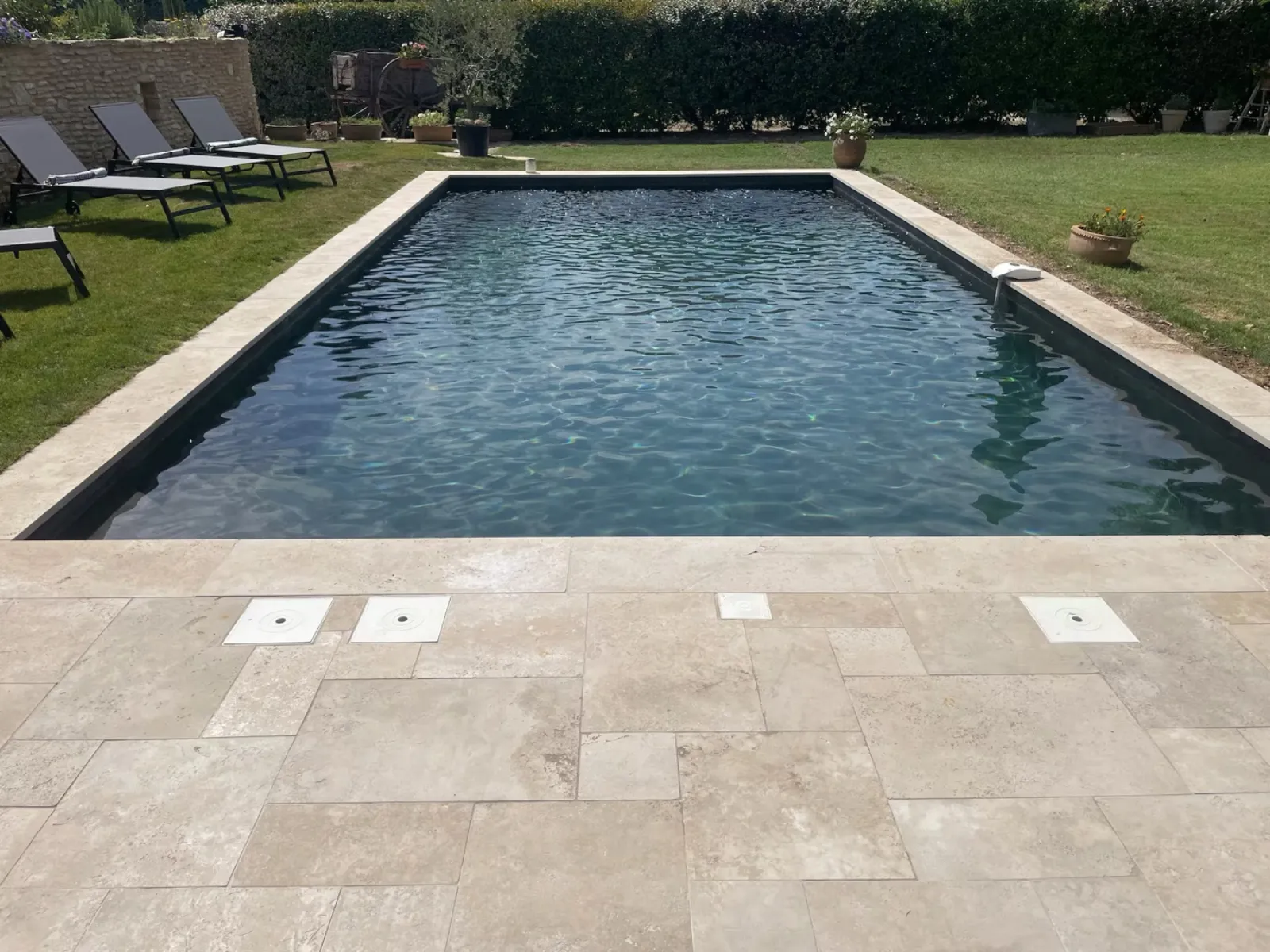
I open Gemini on my computer. I upload the pool photo — the one from the current listing. A decent shot, taken at noon in July, harsh light, empty loungers in the back, not a single prop, the water a lovely blue but no mood at all.

I just type this:

"Improve this photo by bringing it to life."

No sophisticated prompt. No precise instructions. I wanted to see what the AI would do on its own, without telling it anything more.

Fifteen seconds later, I get this.

Airbnb photo before: stark pool, empty loungers, midday light
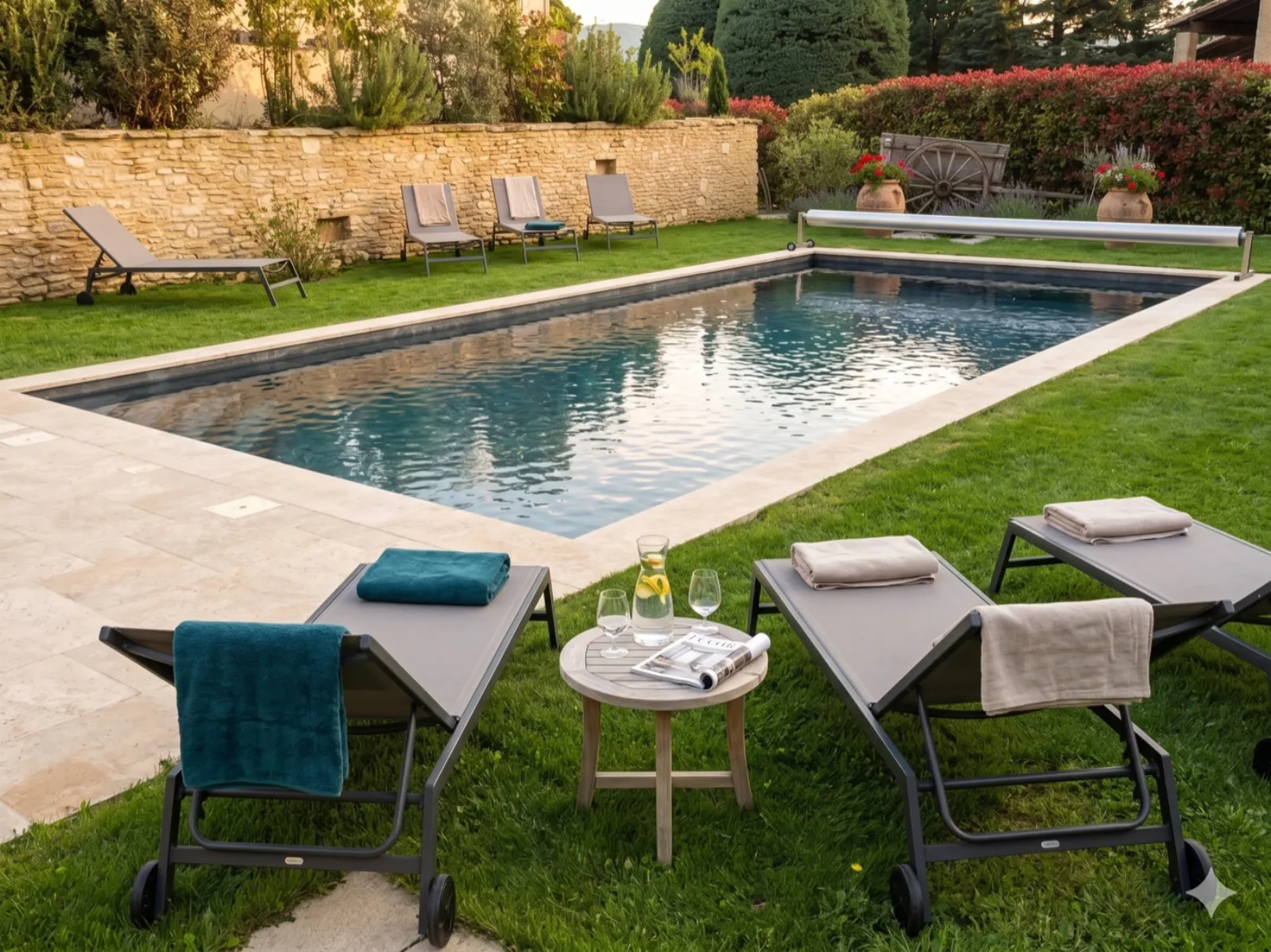
Airbnb photo after AI: pool with drinks laid out on a table, loungers with towels, golden light

The same pool. Except the AI added two loungers in the foreground with folded towels, a small table with a water carafe, two glasses and a magazine, flowers on the low wall, and swapped the midday light for a golden early evening.

I had a moment where I just froze. The AI didn't invent a different pool. It kept mine: same shape, same water, same stone wall behind, same lounger positions in the back. It just added everything that turns an "OK" photo into a photo where you want to be.

I went over to my mom with my computer. She frowned, then said: "But it's the same! Except it's better."

— The five transformations

Five photos, five surprises.

I got into it. While we finished breakfast, I ran the other listing photos through Gemini, always keeping the same instruction: "Improve it by bringing it to life." Sometimes I nudged it a little ("put the drinks on the table," "add colorful cushions"), but often the AI figured it out on its own.

1 · The stone summer kitchen

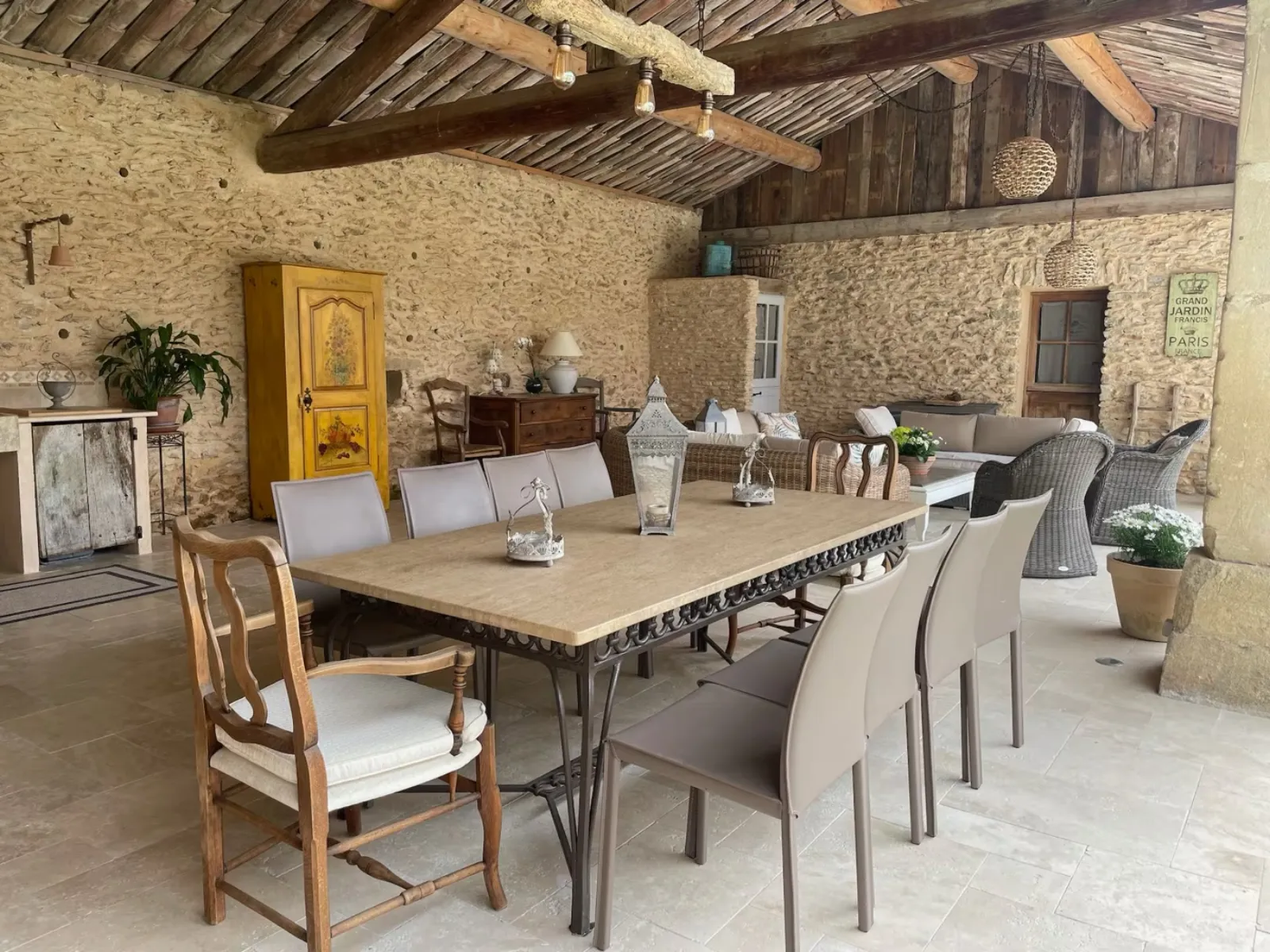
Her summer kitchen — an outdoor kitchen sheltered under a stone lean-to, with a big stone table, chairs, a bread oven, and a Provençal yellow cupboard in the back. A beautiful room. A bare photo, empty table, no atmosphere.

Stone summer kitchen before AI retouching, empty table
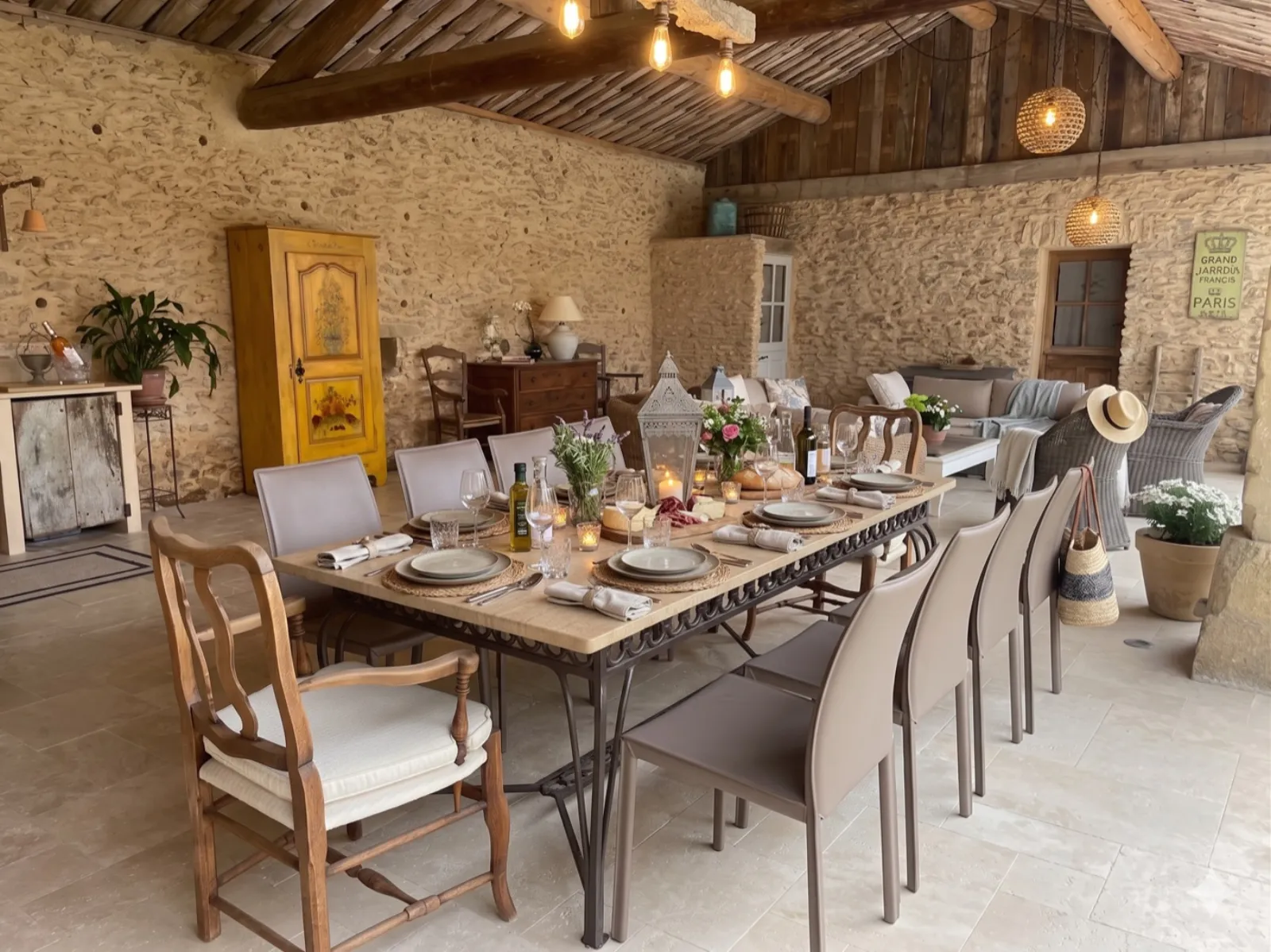
Stone summer kitchen after AI retouching, table set for twelve with lantern, flowers, bread, olive oil

Table set for twelve, jute placemats, wine glasses, a bouquet of wildflowers, a lantern, a baguette, a bottle of olive oil, lit candles. The stone table, the yellow cupboard, the stone wall, the sofa in the back: all of it stayed exactly the same.

2 · The farmhouse seen from the pool

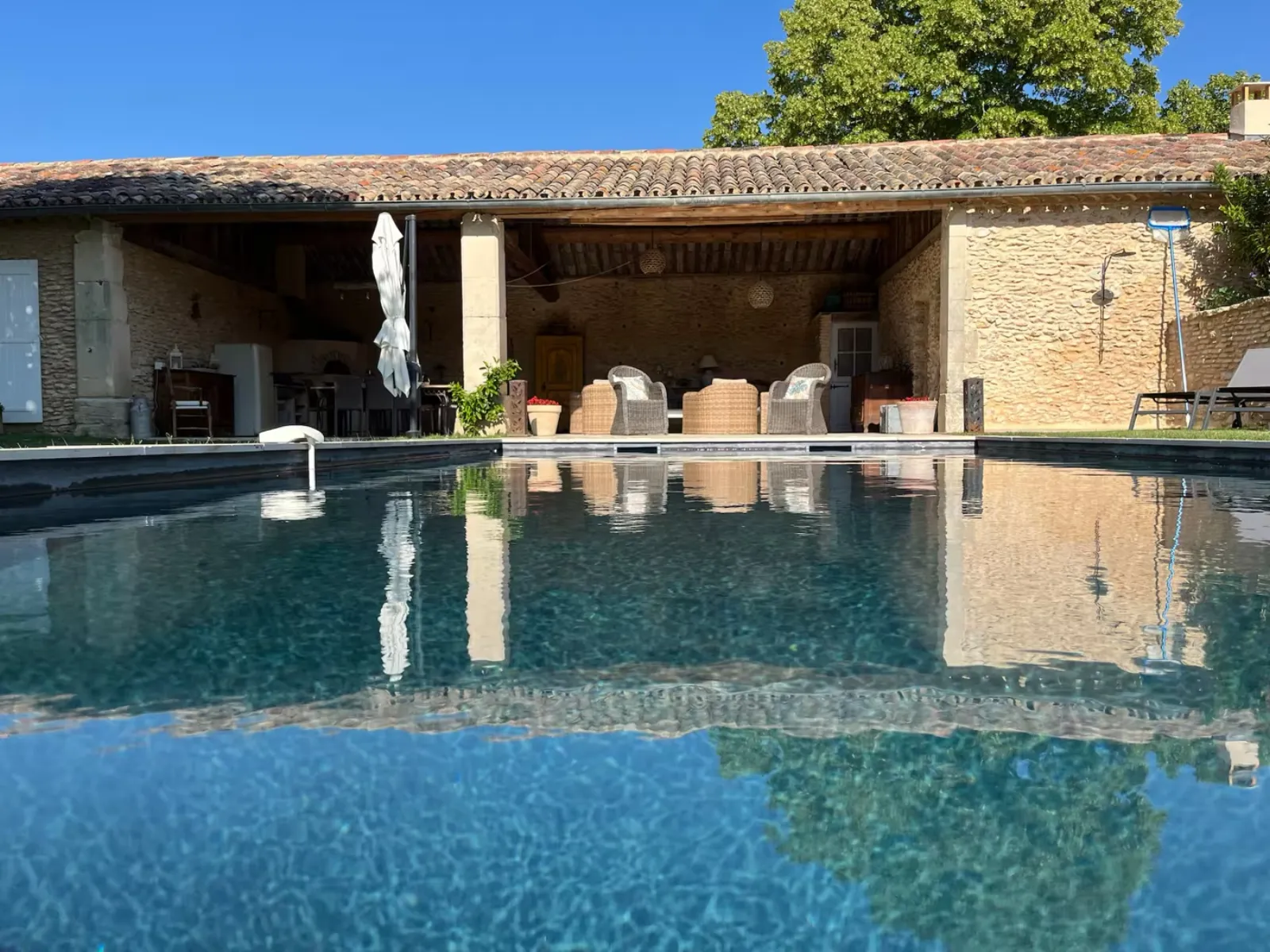
The most iconic photo of the listing: the house seen from afar from the pool, reflected in the water. A photo that shows the architecture but doesn't make you want to live there.

Stone farmhouse seen from the pool before retouching, two rattan chairs under the overhang
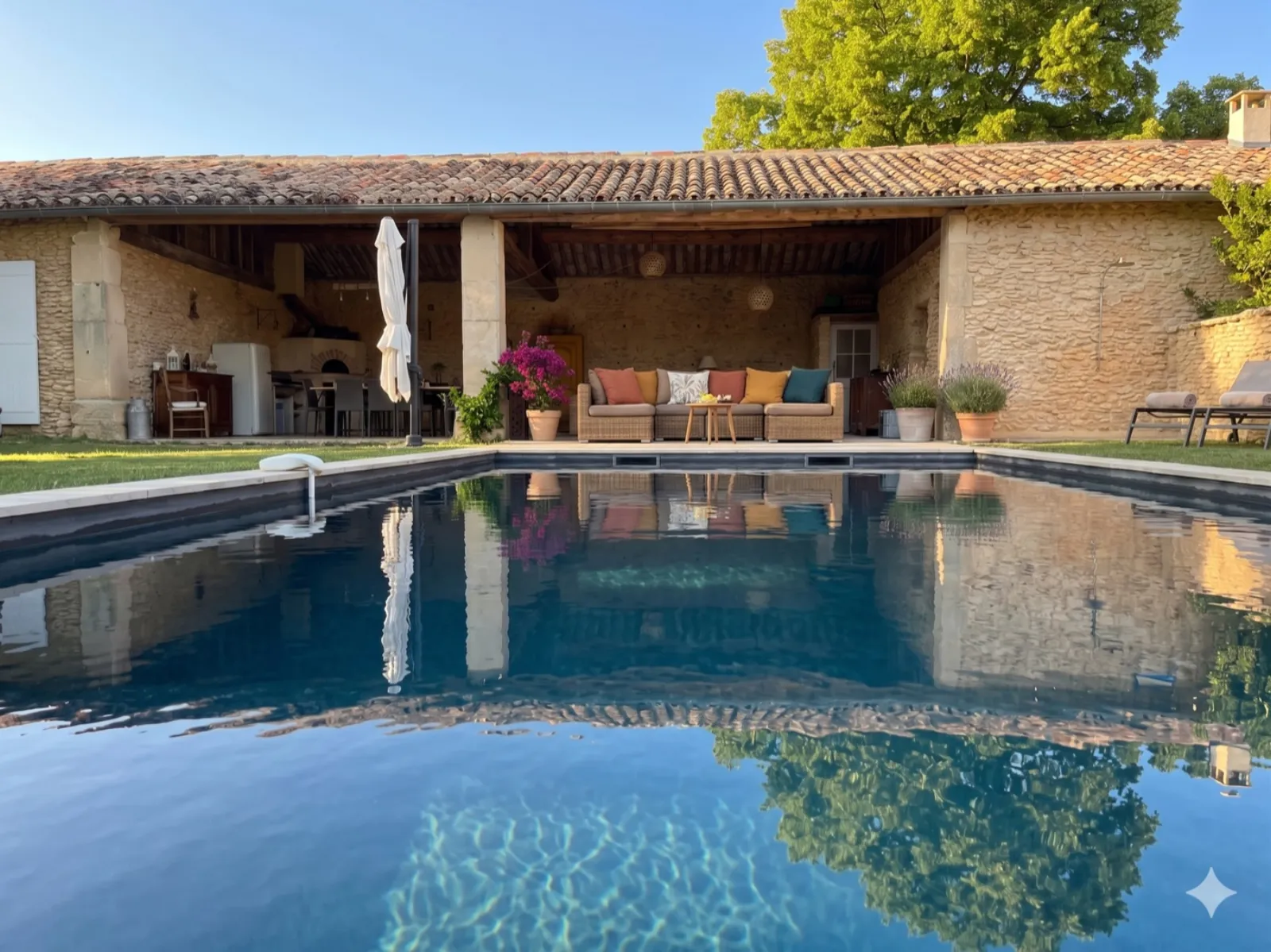
Same farmhouse after retouching, garden lounge with colorful cushions under the overhang, closed parasol, loungers with towels, potted flowers, golden hour light

A garden lounge with yellow-orange-terracotta cushions under the overhang. A pink bougainvillea peeking through. A cream parasol. Loungers with towels on the right. A pot of lavender. Late-day light. Same house, same pool, same perspective — but now you want to spend the whole week there.

3 · The living room

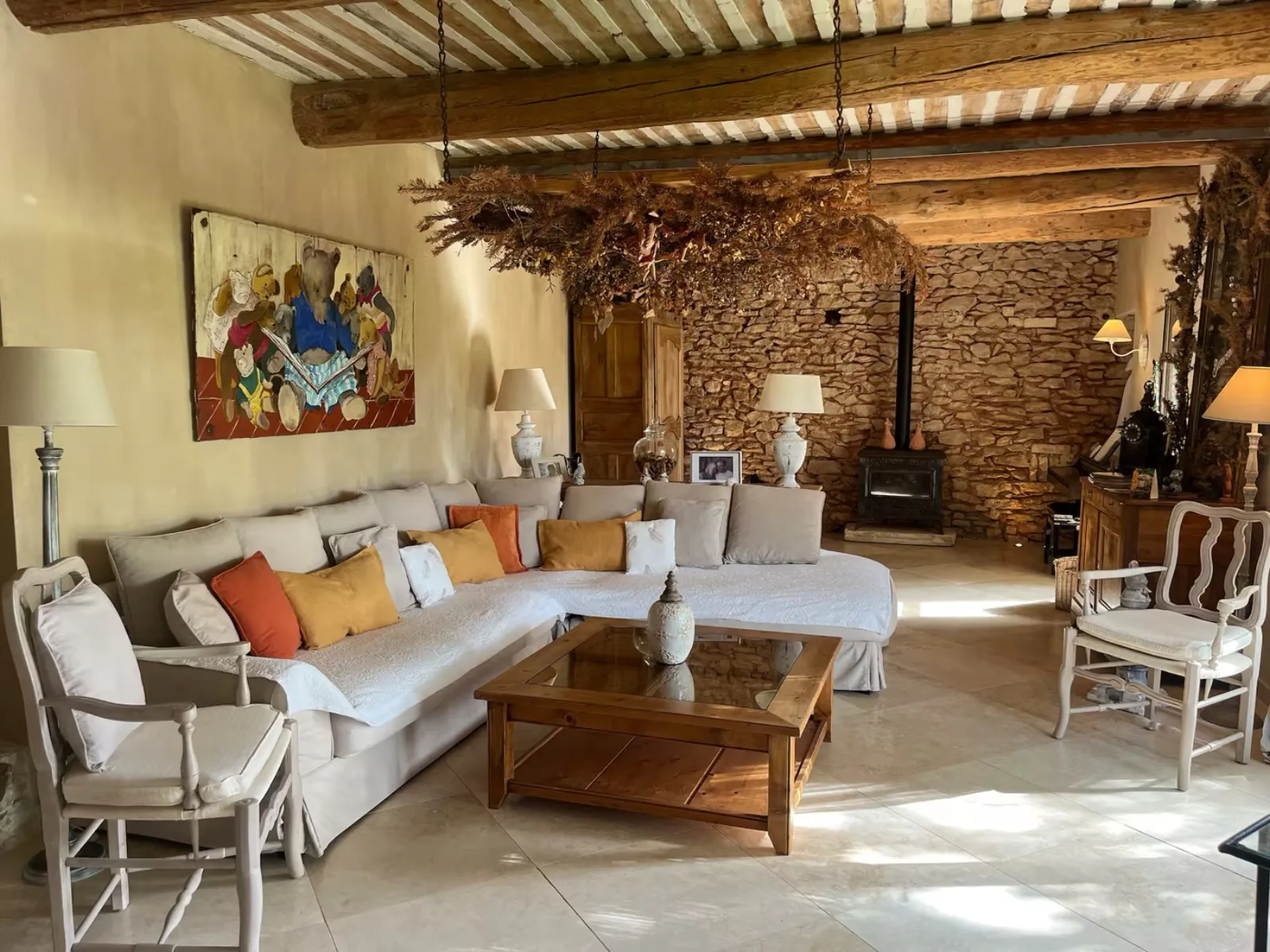
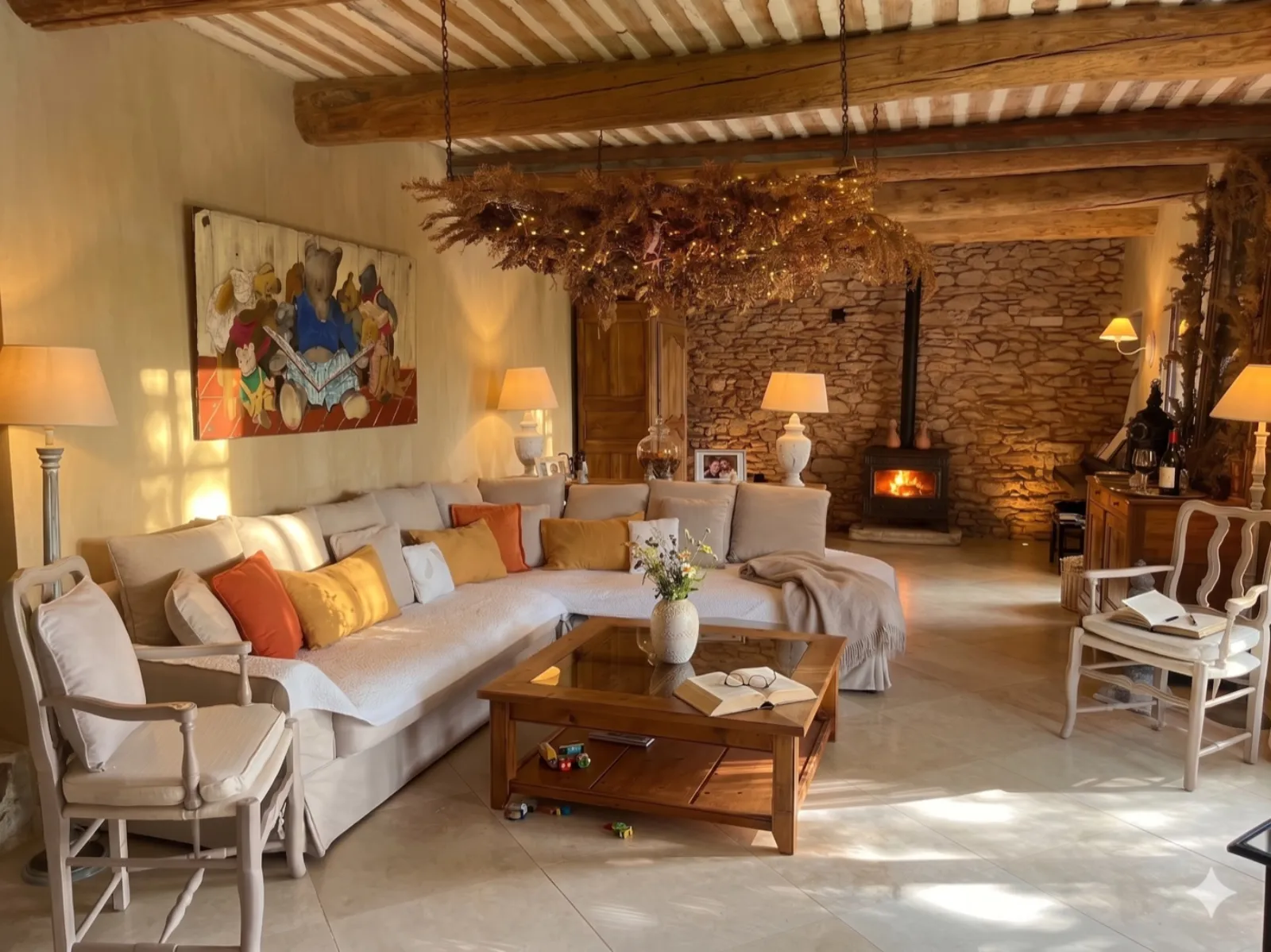
Main living room, white corner sofa, a hanging plant with fairy lights, an art piece on the wall, a wood stove in the back. Pretty, but lifeless in the photo.

Living room before retouching, white sofa, unlit wood stove
Same living room after retouching, fire lit in the stove, added cushions, throw on the sofa, open book on the coffee table

The fire is lit in the stove. A throw tossed over the sofa. A few kids' toys on the floor. A bouquet on the coffee table. The room feels alive. And the fairy lights on the hanging plant are actually glowing, as if it were a winter evening.

4 · The indoor dining room

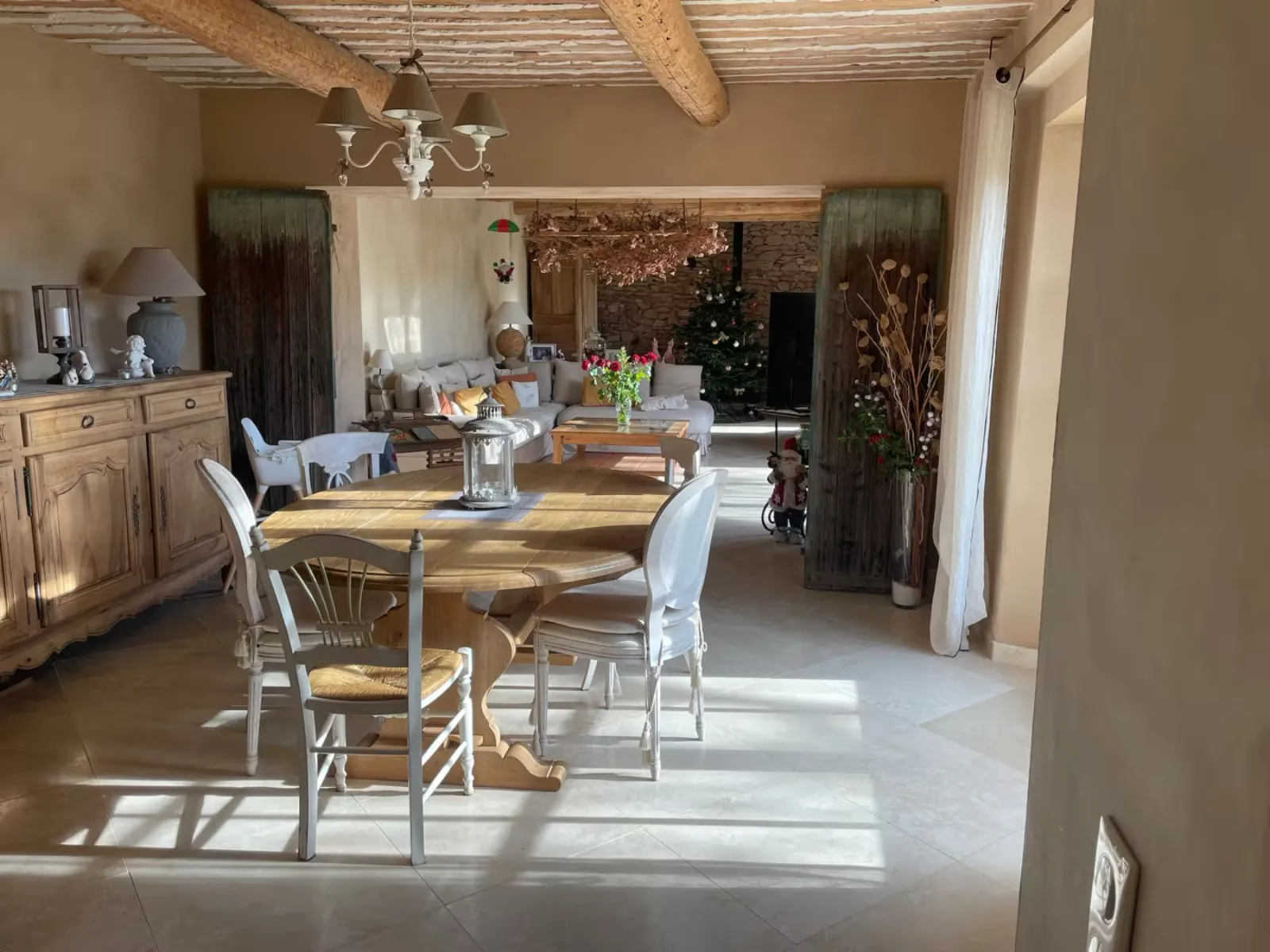
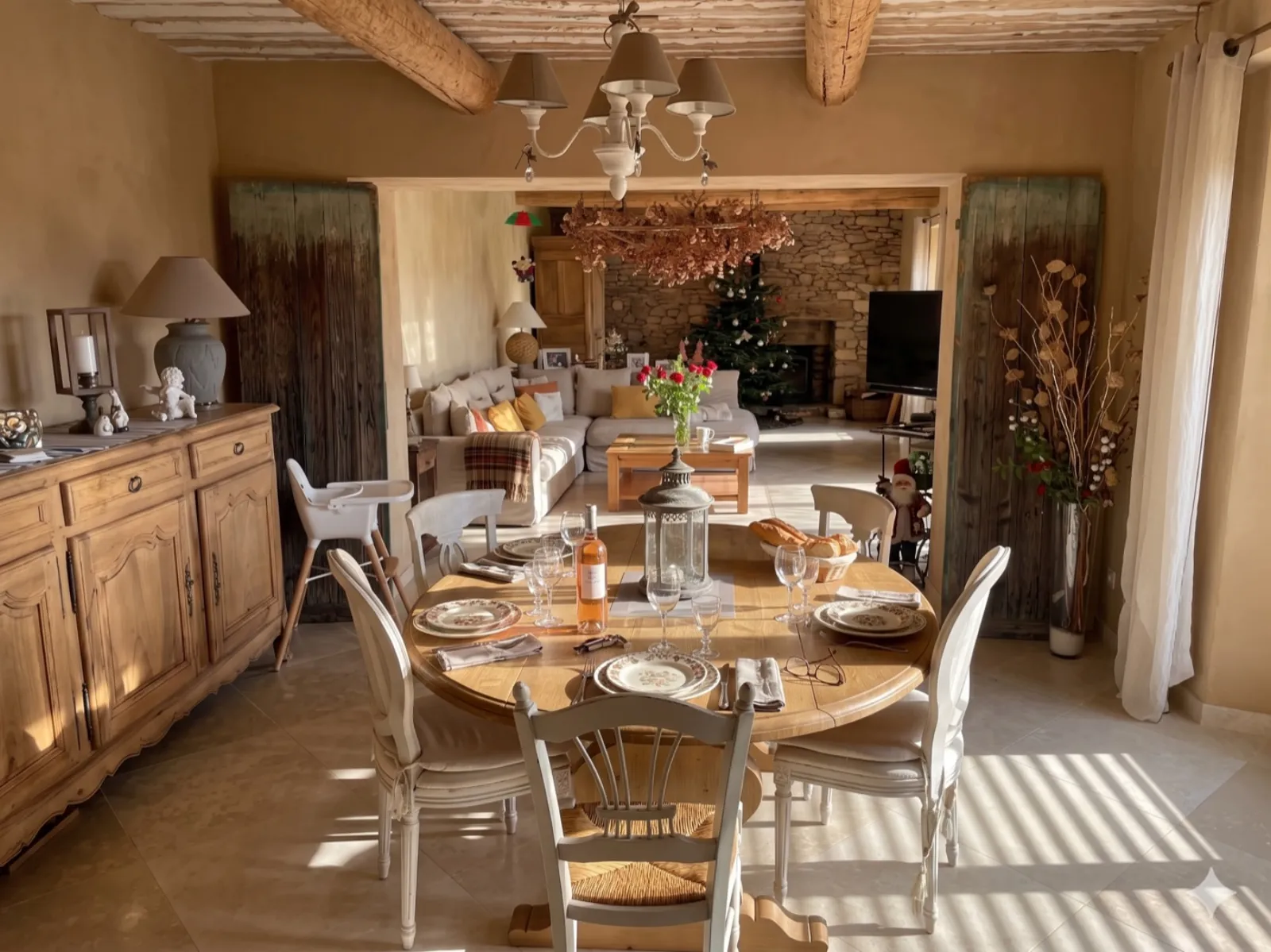
Indoor dining room open onto the living room, round table in light wood, white chairs, a view of the Christmas tree in the back (the photo had been taken in December).

Indoor dining room before retouching, bare round table
Same room after retouching, table set with cutlery, glasses, a bottle of rosé, flowers, bread

Table set for six. Porcelain plates, wine glasses, a bouquet of roses in the center, a lantern, a bottle of rosé front and center, a baguette laid on a board. The Christmas tree in the back stayed, a sign the AI respected the room exactly as it was.

5 · Bonus — the pool in broad daylight

One last transformation, just to see: the same pool but with a more precise instruction. "Add flowers on the low wall, loungers in the foreground, and keep the mid-afternoon light."

Result identical to the first one, but this time with the midday light kept. Proof that the AI doesn't force its own style: if you tell it "keep the light," it keeps it. If you say nothing, it goes with the most flattering one — namely golden hour.
— The takeaway

What stays, what changes.

Running through these tries one after another, I quickly saw what Nano Banana did well and what it avoided on its own. It's interesting because it draws the line between useful retouching and marketing lies.

What stays intact (the building)

The AI never touched the architecture, the walls, the beams, the pool itself, or the fixed furniture. It faithfully kept every structural element. The pool's shape is identical, the stones in the wall are the same stones, the fixed furniture (sideboard, cupboard, sofa) stayed in place.

What changes (the staging)

Everything that counts as dressing changed: the table, the cushions, the linens, the flowers, the candles, the fire in the fireplace, the late-day light. These are exactly the things a professional photographer adds on site — except that instead of paying 500 euros and half a day, it cost you three minutes per photo.

The rule that feels healthy to me

As long as you add things that really exist at the host's place (loungers stored in the shed, dishes in the cupboards, a fireplace fire from a fireplace that actually exists), it's virtual home staging. It's what a photographer would do on site. The moment you start inventing a pool where there isn't one, that's deceiving the traveler — and that's a no.

What impressed me

The consistency across photos. The AI recognizes it's the same place from one photo to the next. When I reworked the indoor living room after the dining room, it kept the same decorating style, the same dominant colors. Like a photographer with a through-line across the whole series.

What leaves me on the fence

On some photos, the AI tends to overdo it. Too many flowers, too many candles, too many objects on the table. It sometimes gives off a "catalog" vibe. The counter-prompt that works: "More understated. Keep the essentials." And you get a more believable version.

— The business behind it

Two ideas for 10 million users.

Coming out of this experiment, I figured there's clearly room for a consumer tool. Someone's going to build it. Here are the two most obvious ideas, exactly as I jotted them down in my notebook.

Idea 01 · SaaS

A tool for Airbnb hosts

A simple app. The host creates an account, uploads the raw photos of their listing. In a few clicks, they get the improved versions, ready to publish. The system could offer several moods: "cozy winter," "Mediterranean summer," "family with kids," "romantic couple".

A pricing model that works: three or four euros per photo, or a subscription at 19 euros a month for unlimited use. Target: the 600,000 Airbnb hosts in France, half of whom have never paid for a professional photographer.

Idea 02 · B2B real estate agents

A tool for real estate agents

The agent visits the property with their iPhone and takes the photos as usual. They upload them into the tool, and in two minutes they've got the enhanced-for-the-listing versions: furniture added to empty rooms, light reworked, garden given a springtime boost.

Target: the 30,000 real estate agencies in France. Model: a network subscription at 79 euros per agent per month, or pay per photo. The ROI for the agent is obvious: a listing with beautiful photos sells twice as fast, and that's exactly what they charge their seller for.

What makes these two ideas doable for a non-developer in 2026: you no longer need to train your own model. Gemini's API does the work for a few cents per image. The whole challenge is the product around it: the interface, the presets tuned per use case, account management, billing. A real app in a few weeks with Claude Code, if you know what you want.

If you want to go for it, go for it

I won't be doing it. I already have projects on the go and this one doesn't grab me all that much. But I'm telling you: someone in France is going to take this market within the next 18 months. Might as well be you.

— What I did with mom

The outcome at her place.

When I showed her the five retouched photos, my mom looked at her phone, then at the photo, then back at her phone. She didn't call the photographer back. She published my versions on her listing that same evening.

She doesn't hold it against him — he's a neighbor she likes, someone she runs into at the Sunday market. But 500 euros she doesn't have to spend is 500 euros kept. And the result is better than what we'd have gotten from a classic shoot at noon in harsh light.

Total cost of my experiment: one hour of my time on a Saturday morning, and zero euros (I used Gemini's free version, which includes a daily image-editing quota that's more than enough for this).

— Questions people ask me

FAQ Airbnb photos and AI.

What is Nano Banana?

Nano Banana is the nickname users gave to Google's image-editing model, built into Gemini. It lets you tweak an existing photo while keeping the real elements (architecture, furniture, perspective) and adding precise touches: changing the light, setting a table, adding furniture, putting out flowers. You use it through a simple conversation with the AI.

Can you use AI to improve the photos of an Airbnb?

Yes, and the result can beat a professional photographer's. Starting from a raw shot taken on a phone, an image-editing AI like Nano Banana can add furniture, set a table, light a fireplace, and rework the lighting, all without touching the actual building. Cost: a few minutes per photo, versus 300 to 800 euros for a professional shoot.

Isn't it misleading for travelers?

It all depends on what you ask the AI to do. As long as you keep the real building and only add movable items that genuinely exist at the host's place (loungers, a table, dishes, a fireplace fire when there's a real fireplace in the house), it's acceptable virtual home staging — like a photographer setting the table before a shoot. If you add a pool where there isn't one, that's deception.

How much does a professional Airbnb shoot cost?

Between 300 and 800 euros for a half-day, depending on the region and the photographer's reputation. The rate usually covers 25 to 40 retouched photos. Compare that with a few euros per photo through an AI, and about an hour of work for a dozen photos.

Could you turn this into a business?

Absolutely. Two obvious paths: (1) an app for Airbnb hosts who upload their raw photos and get AI-improved versions back in a few clicks, for a few euros per photo; (2) a tool for real estate agents who snap the photos on their phone and get enhanced versions. Both markets add up to millions of potential users in France.

What are the best prompts to improve an Airbnb photo?

The most surprising part: a plain "improve this photo by bringing it to life" already gets you 80% of the way there. The AI understands it needs to set the table, light the fireplace, add cushions, put out flowers, and rework the light. You can then fine-tune: "add two glasses of wine and a magazine on the little table," "give it late-afternoon light," "add loungers in the foreground."

— Going further

3 articles to read next.

Jérémy Sagnier
Thanks for reading this far 👋

Shall we keep going?

I test AI for real and I share what works, no jargon, no hype. If this article helped you, the easiest way to never miss anything is my Friday letter. And if you've got a question or a doubt: reply to me, I read everything.

Get the newsletter → Read more articles