We dropped Calendly and Letsignit.
Here's how we
built our own.
One Sunday night in March, I'd had enough of paying for two subscriptions (Calendly for appointments, Letsignit for email signatures) with so-so results and zero control over the brand. A week later, we had our own in-house tool that did both. On-brand, hosted by us, with a full back office where every advisor manages their own page and signature. Today 20 people use it daily. The honest, no-filter story of how we did it.

What you'll find inside
- The trigger: it wasn't Calendly's price. The real problem was being unable to apply our visual identity and our customer reviews. And since we were rebuilding a tool anyway, we might as well kill Letsignit in the process.
- The team: just me from Sunday to Friday night, with Claude Code as my co-pilot. Max, our dev, came in at the end for security and the launch.
- The result: a tool we control 100%, plugged into the team's Outlook calendars, with automatic reminders, harmonized email signatures, and a back office where everyone manages their own page on their own.
- Today: 20 people at Eurofiscalis use it every day. More than 500 appointments booked since launch.
- The cost: we went from ~€375 a month (Calendly + Letsignit combined) to about €30 a month in servers. ~€4,140 saved per year, and we're no longer dependent on two third-party tools.
- Transparency: article written with Claude (reviewed and approved by me), the booking tool built with Claude Code in pair-programming. If you spot an error, write to me, I'll fix it.
The day Calendly stopped being fun.
To set the scene: Eurofiscalis is an international tax firm founded by my brother Kevin in 2017. We help e-commerce sellers all over Europe with VAT, the reverse charge, and online filings. And like any consulting firm, we book a lot of appointments. First contact, client follow-up, audit, sales pitch. Several hundred a month, across 20 people.
For a long time, we did this with Calendly. Perfect tool on paper: you share your link, the client picks a slot, the event lands in your calendar. It's become a market standard. Team plan at 16 dollars per user per month (see Calendly pricing). Multiplied by 20 salespeople and advisors, it cost us around 320 dollars every month. Not the end of the world.
In parallel, we were also paying for Letsignit, another French software specialized in email signatures. The idea · that all advisors would have a uniform signature in Outlook (photo, title, phone, booking link, Eurofiscalis logo), maintained from a central console. Account around €80 a month for 20 users on the standard plan. Again, not the end of the world, but it ended up being ~€375 every month across the two tools, just to manage appointments and signatures.
But one Sunday night in March, while looking at the booking page of an advisor who'd just joined, I froze. The photo wasn't the right format. The title was off-center. The colors weren't ours. No customer review at the bottom. Nothing that said "you're about to meet someone from Eurofiscalis." It was just one more Calendly page, like the millions out there. And that same advisor's email signature wasn't displaying correctly for half her recipients (the classic Letsignit issue with older-generation Outlook on Windows).
The real problem wasn't the price
The money, I could have lived with. The issue was the inability to customize things properly. Calendly lets you change one accent color and that's it · no layout, no testimonials section, no logo built into the confirmations, no email template in your own colors. Letsignit is more flexible on the visuals, but it's still a third-party piece of software that makes your signature dependent on an outside service. And each advisor was doing their own thing · the result, 20 mismatched pages on one side, signatures breaking in Outlook on the other.
I made myself a list of what we'd want if we started from a blank page. And to my surprise, it wasn't that long.
- Our full visual identity · Eurofiscalis green, the INTERNATIONAL FIRM logo, fonts identical to the rest of the site.
- An identical page for every advisor · same structure, same feel, just the photo and the pitch changing.
- Verified customer reviews at the bottom of the page, to reassure people before they book.
- A native connection to Outlook · the team's main tool. We wanted unavailability calculated in real time, with no manual syncing.
- Confirmation emails in our brand · not an impersonal Calendly template.
- An embeddable widget on the main Eurofiscalis site, so the visitor never leaves the domain.
I read it three times. I thought: "if I hand this list to Claude Code on Monday morning, how long until we have it? And while we're at it, we might as well fold the email signature into the same tool to kill Letsignit too." I took 5 minutes to check that nobody was already selling this as white-label · the existing tools were either even more expensive, even more rigid, or only covered half the need. I was good to go. Monday morning, I'd dive in.
Before I explain how, take a look.
So you can picture it before the rest: here's what my own booking page looks like today, exactly the way a client sees it. This is what we built in one week. The brand is respected, the photo is nicely integrated, the badges (duration, price, scope) are aligned, the Trustpilot reviews show at the bottom, and the calendar displays the real available slots from my Outlook in real time.

On April 24 (the day highlighted in green in the screenshot), I have 4 slots open in the afternoon. If I block one of those slots in Outlook, it disappears from the page within 60 seconds. If someone books, the event shows up in my calendar before I even close the tab. And the client gets a confirmation email in the Eurofiscalis brand right after, followed by a reminder the day before and another 15 minutes before the appointment.
What pleased me most at launch is that the 20 advisors have a version EXACTLY identical to mine. Same structure, same buttons, same colors. Just the photo, the pitch, and the availability changing. The team harmony I was after, we got it.
The build week.
Here's how it actually played out, from the spark on Sunday night to going live on Friday. For context: I'm not a developer. I'm an entrepreneur, I know how to use Claude Code (the AI tool that writes the code for me while I steer), and that's it. Everything that follows, I did with Claude Code in pair-programming (two of us on the same project, the AI types, I steer).
The spark
I list on paper the 6 features to reproduce (brand, identical page, reviews, Outlook, emails, widget). I check that nobody's already selling this properly. I sleep on it.
The site skeleton
I open Claude Code in a fresh folder. I ask for a Next.js project (the modern website engine), with one booking page per advisor at /[slug]. By evening, I have a calendar displaying, with no real data, but properly on the Eurofiscalis brand.
The database
I plug in Supabase (the cloud database, the open-source equivalent of Firebase). I create 4 tables · users, appointment types, availability, appointments. By evening, an advisor can log in, configure their hours, and receive a real booking saved in the database.
The Outlook sync (and the all-nighter)
The big step · plugging in Microsoft Graph (the bridge that talks to Outlook). I struggle for 6 hours on time zones (an event happening at 2pm Paris time, Microsoft sends it back to me in UTC, and my site was showing it at 12pm). Once that was solved, magic · the advisors' Outlook calendars automatically feed the booking pages.
The confirmation emails
First attempt · send the emails via Microsoft Graph (since we're already connected). Bad idea, it fails one time in ten for no reason. I switch to Resend (a dedicated email service that works on the first try). I design 3 templates · confirmation, day-before reminder, 15-minutes-before reminder. All in the Eurofiscalis brand.
Max comes in to help
I hand the project to Max, our developer. Mission · security audit before launch (checking the safeguards, the database permissions, the classic attacks). He finds 3 things to fix in 2 hours, and we fix them together.
Going live
We deploy on Vercel (the host that runs Next.js sites in a few clicks). We point a domain name · booking.eurofiscalis.app. The first 20 advisors are created, photo + pitch loaded. At 7pm, the first appointment is booked by a real client.
The back office (the real, unanticipated slog)
I'd assumed we'd just have 20 public pages + Outlook synced. Wrong. Without an admin interface, I had to go into the database by hand to add an advisor, change their pitch, update their photo. Unmanageable. Over two weeks, we built a real, full back office · self-service onboarding, personal page setup, availability management, an email-signature generator, downloadable virtual video backgrounds.
Polish + 2-person booking + security audit
We iterate continuously on the team's feedback. Max goes back over it for a full audit (5 phases · XSS holes, database permissions, monitoring, accessibility). We add the 2-person booking feature (two advisors present at the same time), a debug mode, reminders 15 minutes before. It's become the everyday tool for the whole company.
What this week taught me
The interesting tool is no longer the one that can do everything (Calendly does 100 things, of which I use 5). It's the one that does exactly what you need, in YOUR image. And with Claude Code, the bar to building your own has become ridiculously low. You no longer need a dev team, you need to know what you want and how to steer.
What makes the team love it.
Beyond the brand (which was the spark), three features made the 20 advisors adopt the tool without grumbling. None of them existed on Calendly in the same way.
The 2-person booking
An advisor can generate a special link that books a slot for them AND a colleague. The tool automatically figures out the slots where both are free. Super handy for client onboarding where you want to pass the client to your successor.
Harmonized email signatures
The tool also generates each advisor's email signature from the same info (photo, title, pitch). One click, you copy-paste into Outlook. Every salesperson has the same flawless signature, with zero effort. No more cobbled-together signatures with 4 different fonts.
The embeddable widget
One line of code to paste on the main Eurofiscalis site, and any page can display a booking calendar directly, without sending the visitor elsewhere. The client never sees that they're leaving our world.
The 2-person booking in particular completely unlocked a tension we'd had for a long time · the handoffs between salespeople and technical advisors. Before, we'd run two separate appointments, and the client felt like they were repeating their story twice. Now it's a single slot, two people on the call, a real sense of continuity.
The back office the team runs.
What I hadn't anticipated when I started: the public tool is only half the work. The other half is everything the team needs to be able to run themselves · configure their page, open and close their slots, edit their pitch, update their photo, manage their time off, generate their email signature. At first, I did all of it by hand in the database. By the 5th advisor, it was unmanageable. We built a real back office in two more weeks.
Configuring your booking page
This is the page each advisor sees to manage their own profile. A single URL (/ma-page-rdv), everything's in there · the public link to share, the appointment types (30-min consultation, VAT consultation, whatever you want), availability week by week with a lunch break, the booking settings (how many days in advance, how many hours' notice minimum). And the famous 2-person booking feature · you click, you pick a colleague, the tool generates a special link that only offers the slots where you're both free.
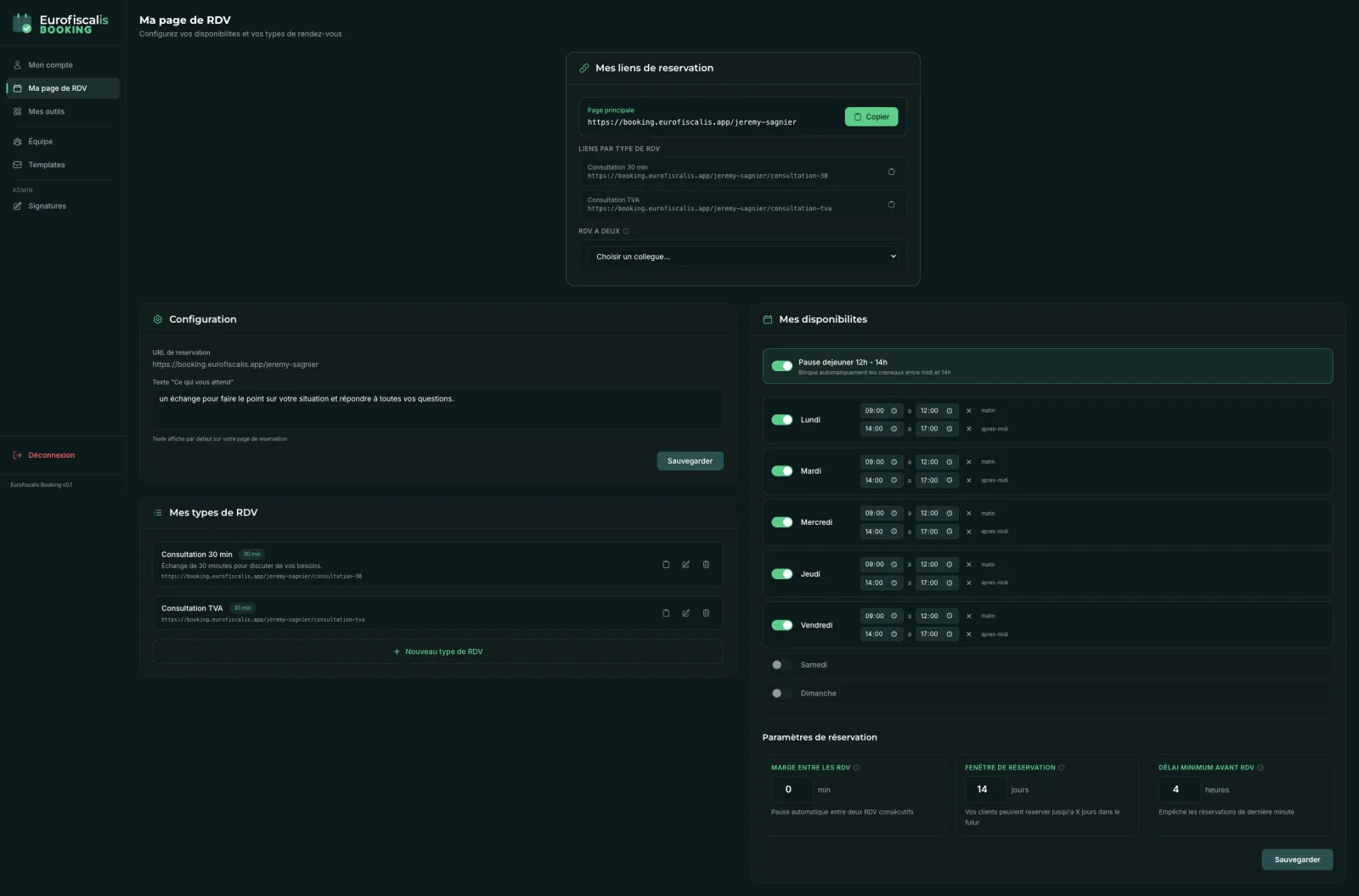
/ma-page-rdv page · each advisor runs their own, on their own
What made the difference on the team's side was total autonomy. Before the back office, an advisor who wanted to change her pitch would email me, I'd open Supabase, edit it by hand, and it was live that evening. Now she goes to /ma-page-rdv, edits the field, and it's live in 10 seconds. For her, a sense of control. For me, the end of 50 requests a week.
The harmonized email signature (which killed Letsignit)
On the /mes-outils page, you'll find a generator that builds each advisor's official email signature from the same data (photo, title, phone, booking link, Eurofiscalis websites). You click "Copy," you paste into Outlook, done. The whole team has the same flawless signature. With the VML code (an old format Microsoft forces so circular images display in legacy Outlook on Windows) · it took me 4 iterations to figure out, but once in place, it works everywhere.
Bye bye Letsignit
This /mes-outils page is what let us cancel Letsignit, the email-signature tool we were paying about €80 a month for. The feature is simpler (no fancy visual editor, no promotional campaigns built into the signature) but it does the essentials · a unified signature for the 20 advisors, on-brand, that displays correctly in Outlook. That's all we needed. €80 more saved every month.
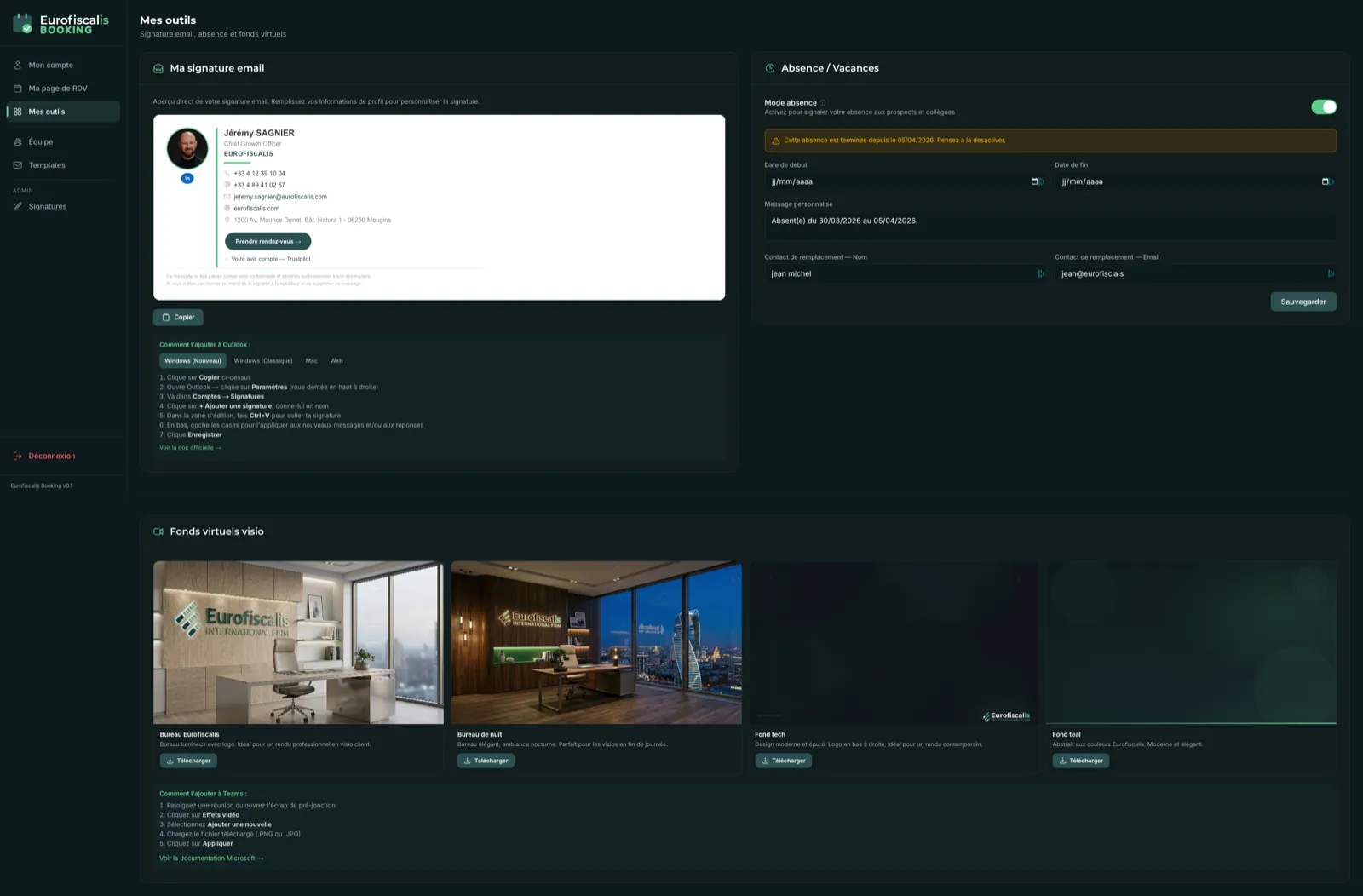
/mes-outils page · email signature · time off · Eurofiscalis virtual backgroundsOn that same page, two tools I hadn't planned but that quickly became indispensable:
- Time-off / vacation management · you set a period, the tool automatically blocks your booking slots and redirects to a colleague of your choice. No more appointments booked while a salesperson is on vacation.
- Virtual video backgrounds · 4 downloadable Eurofiscalis backdrops (office day, office night, office roof, tech background). To put behind you on Teams or Zoom calls. Everyone has the same brand image, effortlessly.
The other back-office pages
For the full tour, here are the 5 pages every advisor sees in the left sidebar:
| Page | For whom | What it's for |
|---|---|---|
/mon-compte | Everyone | Email, password, time zone, profile photo with circular cropping. |
/ma-page-rdv | Everyone | Public page: title, pitch, appointment types, availability, settings, 2-person booking. |
/mes-outils | Everyone | Email signature, time-off management, virtual video backgrounds, Teams instructions. |
/equipe | Admins only | Overview of the 20 advisors, who's connected Outlook and who hasn't. Creating / deactivating accounts. |
/templates | Admins only | Editing the email templates (confirmation, day-before reminder, 15-min reminder). Live preview. |
Self-service onboarding (the feature that changed everything)
When a new advisor joins Eurofiscalis, they get an invitation link. They click, create their account, configure their personal page (title, pitch, photo, appointment types, availability) in 10 minutes, and it's live. Zero involvement from me. This dead-simple feature is what got all 20 advisors deployed in under a day, whereas signing them up manually one by one would have taken me a week.
What I learned building the back office
Three lessons that hold for any internal tool, not just an in-house Calendly:
- The public side is 50% of the job. The back office is the other 50%. Don't underestimate it in your planning. If you want 20 self-sufficient users, budget as much time on the admin as on the visible part.
- User autonomy changes everything. If the team can edit things themselves, they adopt it. If they have to ask you for every change, they give up.
- The small extra details (email signature, video backgrounds) pay off big. They're not "core" features, but they're what makes salespeople tell you "honestly, you did the right thing, it saves us time every day."
The tech choices, explained simply.
If you've never coded, you can skip this section without missing anything. But a lot of people asked me "what did you build it with?" · here's the answer, with a word of explanation for each tool.
| Tool | What it's for | Why this one |
|---|---|---|
| Next.js | The site engine (the equivalent of the engine in a car) | It's the modern standard for building a fast site, and Claude Code knows it really well. |
| Supabase | The cloud database (where the advisors, appointments, and availability are stored) | Free up to a certain volume, simple to plug in, and it also handles user accounts. |
| Microsoft Graph | The bridge that lets our site talk to Outlook (read the calendar, create an event) | Mandatory since we're in a Microsoft 365 environment. Not the most pleasant, but it's the only one. |
| Resend | The service that sends the confirmation and reminder emails | More reliable than sending via Microsoft Graph. Works on the first try and has a clear interface. |
| Vercel | The host that keeps the site running 24/7 | Perfect pairing with Next.js · you push your code to GitHub, it's live in 30 seconds. |
| Sentry | The system that alerts you when something breaks in production | Essential when 20 people use the tool and you can't test every booking by hand. |
If you know these tools, you'll see that nothing is exotic. It's a standard set that any web startup uses in 2026. What changes the game is Claude Code, which let me orchestrate all of this without being a developer. It too has become a standard.
What it really costs us.
Lots of people asked me "OK but what's the final price?" Here's the frank comparison.
| Solution | Monthly cost | Annual cost |
|---|---|---|
| Calendly Teams · $16/user × 20 people | ~$320 (~€295) | ~€3,540 |
| Letsignit · standard plan, 20 users | ~€80 | ~€960 |
| Total of the two SaaS | ~€375 | ~€4,500 |
| Our in-house booking tool · Vercel + Supabase + Resend combined | ~€30 | ~€360 |
| Annual saving | ~€4,140 | |
Of course, there's a caveat. Our cost doesn't include my time (5 days on the core + 2 weeks on the back office) or Max's (1 day). If you value those days at a freelance developer's rate (~€600 a day), you add €9,000 of "hidden cost" in the first year. So in the first year, we're still in investment mode.
The saving becomes massive from the second year on. And above all, we're no longer dependent on two suppliers · if Calendly or Letsignit triple their prices tomorrow, shut down a feature we loved, or change product direction, it's no longer our problem.
What to know before you dive in
An internal tool isn't free over time. You have to maintain it · fix bugs, update libraries, handle new use cases. Count on 1-2 days a month of light maintenance. If you have neither Claude Code nor a dev available for that, you're better off sticking with the subscription.
The 4 traps we didn't see coming.
I'm not going to tell you everything went off without a hitch. Here are the 4 real pitfalls we discovered along the way, and how we handled them.
Trap 1 — Time zones (Wednesday's all-nighter)
You create an event at 2pm Paris time. Outlook sends it back to you in UTC (the universal reference time, i.e. 12pm). If you don't convert correctly, your site shows slots at times that don't exist. I spent 6 hours on it with Claude Code, and we ended up using a dedicated library (date-fns-tz) that does the conversion cleanly. Golden rule · never hack the conversion together by hand, use a battle-tested library.
Trap 2 — Double booking the same moment
Two clients clicking the same slot at the exact same second · both can book, and your advisor ends up with two parallel appointments. It's rare but it happens. The fix is called a "unique index in the database" · you force Supabase to refuse the second identical slot. Once in place, problem solved for good.
Trap 3 — Microsoft Graph emails failing silently
First attempt at sending the confirmations · we go through Microsoft Graph (since we're already connected). One time in ten, the send fails, with no error, no feedback. The client never gets their confirmation. Disaster. We switched to Resend (a dedicated email service). Simpler, more reliable, not a single miss in 4 weeks of production.
Trap 4 — Outlook login tokens expiring
When an advisor connects their Outlook, they get a "token" (a temporary password used to talk to Microsoft). That token expires every hour. If you don't refresh it in time, their page stops working until they reconnect. We ended up putting in a system that refreshes the token automatically before it expires. Invisible to the user, but without it the tool would have been unusable.
None of these traps are exotic. You'll find them in any project that syncs with a calendar. The difference is that we discovered them while building, and learned to handle them properly before launch. That all-nighter Wednesday is still a fond memory.
What I'd do again (and what I wouldn't).
What I'd do again without hesitation
- Start with Claude Code from day 1, without trying to do it "by hand." The AI speeds up laying the foundations so much that waiting would be a mistake.
- Plug in the Outlook sync very early (D3 for us). It's the feature that made the 20 advisors adopt the tool without grumbling · they have nothing to do, their calendar is the single source of truth.
- Use Resend for the emails, not Microsoft Graph. Specialization = reliability.
- Have a dev do the security audit before launch. Max found 3 vulnerabilities in 2 hours that I'd have missed. Essential.
What I wouldn't do again
- Trying to send the emails via Microsoft Graph first. I lost a day. Resend from the start would have been simpler.
- Hacking time-zone handling together by hand. Always use a dedicated library (date-fns-tz) from the very first line of code.
- Underestimating the maintenance after launch. Count on 1-2 days a month for small bugs and improvements. If you don't have that resource, stick with the subscription.
Who this makes sense for
Honestly, building an in-house Calendly only makes sense if you tick at least two of these boxes:
- You have a team of 10 people or more taking appointments (below that, the saving doesn't cover the maintenance)
- Your visual identity is non-negotiable and the lack of customization blocks you
- You want to own the data (GDPR, regulated sector, sensitive clients)
- You already have a dev available or you know Claude Code in pair-programming
If you tick zero or one, stick with Calendly. It's very well made, and your time is probably worth more than the €200 a month you'd save.
My personal take, in one sentence
Generative AI has flipped the classic "buy or build" equation. For specific internal tools, building it in YOUR brand has become realistic for 20-person companies. Three years ago, that was reserved for startups with a tech team. Not anymore.
If you want to do the same.
I didn't open-source the code (it's Eurofiscalis's internal tool), but I can tell you where to start if you want to take on a similar project or another one · rebuilding your CRM, your quoting tool, your project management on-brand.
- Install Claude Code · it's the companion that makes all of this possible. My full guide is here.
- Read my 6-month report of using Claude Code daily · what works, what doesn't, how I use it to run my projects. The article is right here. And for another similar making-of (a field sales tool built in two weeks with Claude Code), it's over here.
- Test with a small project first. Don't take on a Calendly straight away. Start with a mini internal tool (a form, a simple dashboard) to get your hands dirty. You'll quickly see whether Claude Code suits you.
- Find a Max. Having a trusted developer who can take 1-2 days for security and the launch is priceless. Without Max, I'd never have dared put this tool in the hands of 20 people.
If you're reading this article and wondering "could I do it where I work?", the honest answer is probably yes, if you have 5 days ahead of you and a bit of patience. The bar has never been this low. And the satisfaction of seeing 20 people use a tool you built every day is well worth the 5 short nights.
If you'd like me to tell you about other internal projects we build this way (right now I'm working on an agent that qualifies our leads on WhatsApp), sign up for AI Playbook · my weekly watch. And if you launch a similar project, write to me, I love reading what other entrepreneurs who try are getting up to. I reply to everything.
FAQ Eurofiscalis booking.
Why did you leave Calendly and Letsignit?
The real trigger wasn't the price but the inability to properly customize the booking pages and email signatures to match our Eurofiscalis brand. Calendly only let you change one accent color, and the 20 advisors had mismatched pages. Since we were rebuilding anyway, we killed Letsignit in the process.
How much did Calendly and Letsignit cost before?
Calendly Teams at 16 dollars per user per month, roughly €295 for 20 people. Letsignit around €80 a month on the standard plan. A combined total of about €375 a month, or roughly €4,500 a year.
How long did it take to build the tool?
Five days for the core, from Sunday night (the spark) to Friday night (going live). Then two extra weeks to build the full back office (self-service onboarding, signatures, video backgrounds) that I hadn't anticipated at the start.
What tech stack did you use?
Next.js for the site engine, Supabase for the database, Microsoft Graph for the Outlook sync, Resend for the emails, Vercel for hosting and Sentry for monitoring. Nothing exotic — it's a standard set of tools that any web startup uses in 2026.
How does the 2-advisor booking feature work?
An advisor generates a special link that books a slot for them AND a chosen colleague. The tool automatically figures out the slots where both are free in Outlook. Super handy for handoffs between a salesperson and a technical advisor: one slot, two people on the call, the client no longer has to tell their story twice.
How many people use the tool today?
20 advisors at Eurofiscalis use it every day. More than 500 appointments have been booked since it went live in April 2026.
How much does the in-house tool cost per month now?
About €30 a month combined for Vercel, Supabase and Resend. That's around €360 a year, versus €4,500 before. A saving of roughly €4,140 a year. That cost doesn't include the build time (5 days + 2 weeks) or the maintenance (1 to 2 days a month).
Why did you switch from Microsoft Graph to Resend for emails?
Sends through Microsoft Graph failed silently about one time in ten, with no error and no feedback, and clients never got their confirmation. Resend, a dedicated email service, works on the first try and hasn't had a single miss in four weeks of production. Specialization won out over integration.
Do you have to be a developer to build this kind of tool?
No. I'm not a developer, I'm an entrepreneur, and everything was built with Claude Code in pair-programming (the AI types, I steer). Max, our developer, only stepped in at the end for the security audit before launch. The bar to building your own internal tool has become accessible.
What technical traps did you run into?
Four main traps: handling time zones (solved with date-fns-tz), double bookings on the same slot (fixed with a unique index in the database), Microsoft Graph emails failing silently (switched to Resend), and Outlook tokens expiring every hour (an automatic refresh system).
Spot an error?
Outdated info, a number that's moved, a technical detail that's wrong? Write to me at sagnier.jeremy@gmail.com · I fix it within 48h max and note the update date at the top of the article. Field feedback is worth a thousand times more than the articles — I read everything, I reply.
Shall we keep going?
I test AI for real and share what works, with no jargon and no hype. If this article helped you, the easiest way not to miss anything is my Friday letter. And if you have a question or a doubt: reply to me, I read everything.